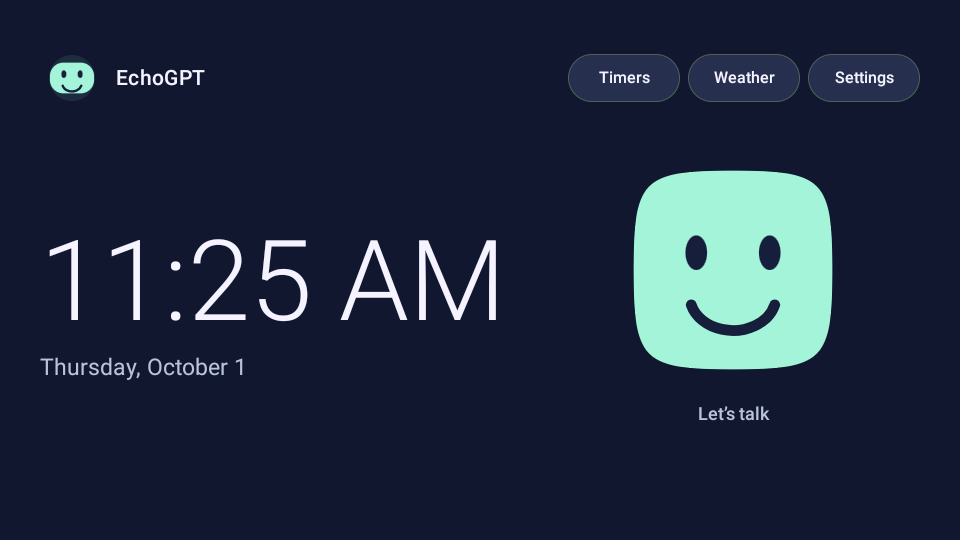
Turn a first-generation Amazon Echo Show 5 into a small, always-ready family assistant. Say “Hey EchoGPT,” wait for the two-note chime, and start talking. Ask questions, search the web, check the weather, set timers, or create recurring reminders. A friendly face reacts during the conversation, and a simple clock screen takes over when you finish.
Free download · EchoGPT 0.5.0 · October 1, 2026
Get the tutorial and source kit
This free download includes an illustrated step-by-step tutorial, the working source code, and a Codex guide that handles much of the setup with you.
- Compatibility: Tested on the first-generation Echo Show 5 (2019), using an Apple Silicon MacBook Pro. Windows setup should also be possible but has not been tested. The first-generation Echo Show 8 has community firmware support; this EchoGPT build has not yet been tested on it.
- Cost and setup: The tutorial is free. You need your own OpenAI API account with billing and a Cloudflare account. ChatGPT subscriptions do not cover API usage. Replacing the Echo's firmware erases its data and normal Alexa software, and carries a risk of making the device unusable. Read the guide before starting.
ZIP, 65 MB · SHA-256 32fbc3ee2d1f4ed62c40271f2d826fbe6cf25176b2f4eb654438fa8a7cdc2cf2
Tested hardware: Echo Show 5, first generation (2019), codename checkers, running the community LineageOS 18.1 Android 11 build. We built and installed this project using a MacBook Pro with Apple Silicon. The steps should also be possible on a Windows PC using Windows versions of the tools, but we have not tested the Windows setup path.
Echo Show 8: The first-generation 2019 model, codename crown, has its own community unlock and LineageOS port. It is a promising candidate for the same project, but we have not tested this EchoGPT build on an Echo Show 8. Use only crown firmware for that model. Later Show 8 generations are outside this guide's verified compatibility research. See Step 15.
This project replaces the Amazon software. It is a community hobby project, not an Amazon or OpenAI product. The tutorial is free; OpenAI API usage is metered separately. The Echo runs independently of your computer after setup.
Step 1Decide how you want to build it
There are two ways to use this download:
- Guided by Codex: Open the extracted folder in a local Codex session and use the starting prompt in
CODEX-SETUP.md. Codex can inspect the device, prepare the tools, build the app, deploy your broker, and guide you through the physical and account steps. It needs local terminal and USB access. A normal ChatGPT chat can explain these steps but cannot directly operate your USB device. - Do it yourself: Follow this tutorial in order. Code blocks use macOS shell syntax unless labeled Windows. Read the expected result after each stage before continuing.
You will still need to plug in cables, press device buttons, authorize USB debugging, sign in to your accounts, approve billing and account access, and listen to the final voice tests. Account passwords, payment details, and API keys belong in the provider's interface or a private terminal, never in a chat message.
Allow an afternoon for a first attempt. Downloads and compilation can take longer than the hands-on work. This is a tested reference build, not a universal one-click installer: different firmware, worn-out storage, and USB problems can require diagnosis.
What you are building
- On the Echo: Android 11, a native home screen, local wake-word recognition, WebRTC voice, local timers and reminders.
- On Cloudflare: Your own small Worker and SQLite Durable Object. It authenticates your Echo, applies limits, and requests short-lived voice credentials.
- At OpenAI: Realtime Mini handles the conversation. A separate Responses request handles a web search when needed.
- At Open-Meteo: Current conditions and forecasts, with attribution.
Idle wake-word audio is processed on the Echo. During a conversation, microphone audio goes to OpenAI. The long-lived OpenAI key stays in Cloudflare. The app does not save audio or conversation history; “Show answer” keeps the latest completed answer in memory until a new call or process restart. Provider data handling remains governed by the provider's policies.
Before replacing the operating system
Flashing erases local data and removes the normal Alexa experience. A wrong image or interrupted write can leave the device unusable. Use a spare device you own and are prepared to erase. The tutorial does not promise a stock-firmware recovery path. Stop on a device mismatch or permanent storage read-only error; repeated flashing will not repair failing storage.
Step 2Gather the parts and downloads
Hardware
- An Echo Show 5, first generation, 2019. Check its identity again in fastboot before writing anything.
- Its normal wall power supply. USB is the data connection, not a substitute for wall power.
- A data-capable micro-USB cable and a USB adapter if your computer needs one. Charge-only cables will not work.
- A MacBook Pro or other suitable computer with internet access and several gigabytes of free storage. The tested host was Apple Silicon macOS; Windows is an untested alternative.
- Wi-Fi for the Echo, plus OpenAI API and Cloudflare accounts.
Software and source links
| Item | Where to get it | Reference version / purpose |
|---|---|---|
| Android platform tools | Google platform-tools downloads | adb and fastboot; reference used 37.0.1 |
| Echo unlock package | Maintainer's Show 5 unlock instructions and attachments | checkers v2 package; read current instructions |
| Unlock source / supported devices | R0rt1z2 amonet | model checks and original scripts |
| Android firmware | Checkers LineageOS 18.1 v0.7 | lineage-18.1-20260904-UNOFFICIAL-checkers.zip |
| ROM instructions | Maintainer's Show 5 ROM thread | installation notes and current known issues |
| Java | Eclipse Temurin downloads | choose JDK 17 and your host CPU/OS |
| Gradle | Gradle 8.10.2 distribution | build runner; compare published SHA-256 |
| Android SDK | Android Studio / command-line tools | SDK platform 35 and build-tools 35.0.0 |
| Node.js | Official downloads | Node 24 for broker tooling/tests |
| Python | Official downloads | Python 3.9+ for small setup helpers |
| Project | starter/ in this download |
actual app, broker, tests, model and native libraries |
Use official project downloads. The kit does not redistribute Amazon firmware or unlock payloads. The XDA pages could not be re-read during this publication pass because of browser restrictions; the GitHub support table, release hashes, source scripts, and reference machine's successful install records were checked. Readers must review the current maintainer notes before writing firmware.
Step 3Prepare a clean workspace
Extract this download into a local folder such as ~/EchoGPT/EchoGPT-Tutorial. Avoid a cloud-synced Desktop or Documents folder: duplicate generated files caused a real build failure during development. Keep a separate private folder such as ~/EchoGPT-private for pairing and signing material.
The useful files are:
EchoGPT-Tutorial/
  EchoGPT-How-To.md          This tutorial
  EchoGPT-How-To.pdf         Printable illustrated edition
  EchoGPT-How-To.html        Browser edition
  CODEX-SETUP.md             Single-prompt guided setup
  starter/                  Buildable project and tests
    app/                    Native Android app and assets
    broker/                 Cloudflare Worker and tests
    setup/                  Fresh signing and private pairing
    dependencies.json       Pinned dependency hashes
    licenses/               Third-party notices
  images/                   Screenshots from the working Show 5
Install JDK 17, Node 24, Python, Gradle 8.10.2 and Android SDK command-line tools. On Apple Silicon, choose the macOS AArch64/ARM64 JDK and Node downloads. Google platform-tools supports Apple Silicon. Android's command-line tools need Java; place their extracted contents under sdk/cmdline-tools/latest/, so latest/bin/sdkmanager exists.
Example macOS environment, adjusting the SDK and Gradle folders to where you actually extracted them:
export JAVA_HOME=$(/usr/libexec/java_home -v 17)
export ANDROID_HOME="$HOME/EchoGPT-tools/sdk"
export PATH="$JAVA_HOME/bin:$HOME/EchoGPT-tools/gradle-8.10.2/bin:$PATH"
export PATH="$ANDROID_HOME/cmdline-tools/latest/bin:$PATH"
export PATH="$ANDROID_HOME/platform-tools:$ANDROID_HOME/build-tools/35.0.0:$PATH"
sdkmanager --licenses
sdkmanager "platform-tools" "platforms;android-35" "build-tools;35.0.0"
java -version
gradle --version
node --version
python3 --version
adb version
Read and accept SDK licenses yourself. The expected tools are Java 17, Gradle 8.10.2, Node 24, SDK 35 and Build Tools 35.0.0. Android 11 on the Echo is API 30; SDK 35 is only the build toolchain. The app intentionally targets API 30 for this private appliance.
Windows notes: Install native Windows JDK, Node, Python, Gradle and platform-tools. Set JAVA_HOME and ANDROID_HOME using Windows Environment Variables, and add their bin, platform-tools and build-tools folders to Path. Use sdkmanager.bat, gradle.bat, npm.cmd/npx.cmd, and py -3 in PowerShell when needed. Use native Windows adb/fastboot for USB; do not assume WSL can see the Echo. The supplied Python helpers support Windows launchers, but that path remains untested on real hardware. test-host.sh needs a POSIX shell, or Codex can run its listed javac and java commands directly.
Step 4Identify the Echo before unlocking
Keep other Android devices disconnected for the firmware steps. Plug the Echo into wall power and connect its micro-USB port to the computer. To enter stock fastboot, power it off, hold Volume Down + Volume Up + Mute, and keep holding while powering it on until the fastboot screen appears. This button combination comes from the maintainer's fastbrick source.
Run these read-only checks:
fastboot devices
fastboot getvar product
fastboot getvar unlock_status
fastboot getvar lk_build_desc
Expected: exactly the intended Echo appears. The Show 5 first-generation product should identify as CHECKERS / checkers; the maintainer's support table also uses product identifier AEOCH. A first-generation Show 8 is CROWN / crown, associated with AEOCW. Do not treat screen size or the retail name alone as proof.
If the device is already running working LineageOS, skip the unlock and wipe stages. If unlock_status is true, do not run fastbrick again. Inspect the installed system and follow the maintainer's already-unlocked route if an OS installation is still needed.
Download the matching files
Obtain the checkers v2 unlock package through the Show 5 maintainer thread linked in Step 2. Extract it and locate amonet/device.prop, profile.sh, and the bin directory. device.prop must say DEVICE=checkers. The reference package has bin/fastbrick.img, a bin/fastbrick-20240709.img variant, and bin/twrp.img. A different package layout is a reason to read its current instructions, not guess filenames.
Download the pinned ROM from the v0.7 release. Its published SHA-256 is:
785fa643fd68b2e6f6f02d96a2da58373c6a577b92a27cf6cec69603bb94068e
Check it on macOS:
shasum -a 256 lineage-18.1-20260904-UNOFFICIAL-checkers.zip
On Windows:
Get-FileHash .\lineage-18.1-20260904-UNOFFICIAL-checkers.zip -Algorithm SHA256
The kit also includes reference-firmware-hashes.json for the actual checkers unlock files used here. Those locally recorded hashes identify our reference files; they are not independent publisher signatures. If upstream changes an attachment, resolve the version difference with the maintainer's notes before flashing.
Step 5Unlock the bootloader and reach TWRP
This is the destructive hardware stage. Confirm the exact model, matching package, reliable power, and permission to erase this device before continuing. Read the current maintainer instructions first. This section records our working path and the Mac adjustment; it does not replace newly published model-specific warnings.
Choose the payload using the package's profile
In the reference checkers package, profile.sh chooses bin/fastbrick.img by default. If the bootloader's lk_build_desc begins with 44072a3-20240709_170103, it chooses bin/fastbrick-20240709.img. Check the actual profile you downloaded. Do not try both payloads to see which works.
On Linux, the maintainer provides fastbrick.sh. On Windows, the package provides fastbrick.bat / fastbrick.ps1; use the instructions for that package. On macOS, the bundled Linux fastboot binary and Bash associative-array syntax are not directly portable to the default shell. Our build used Google's macOS fastboot and the package-selected payload.
The Mac transfer issue we encountered
Google fastboot 37.0.1 initially rejected our 114,468,012-byte payload with a resparse/maximum-download-size error. Sending it with -S 128M preserved the raw payload and allowed the reference unlock to proceed. This is a workaround for that observed checkers package, not a general flag to apply to unrelated devices.
With the correct payload selected, run the equivalent of the maintainer's bounded eight-second host transfer. This example selects the default profile only; change the filename if your verified profile selects the dated variant:
# Run inside the extracted amonet directory, only after the checks above.
python3 - <<'PY'
import subprocess
try:
    result = subprocess.run(
        ['fastboot', '-S', '128M', 'flash', 'brick', 'bin/fastbrick.img'],
        timeout=8)
    print('Host transfer exit:', result.returncode)
except subprocess.TimeoutExpired:
    print('Host transfer timed out as the upstream script expects;')
    print('leave power connected and verify the device transition.')
PY
A timeout is not proof of a successful unlock. Leave power connected while the device completes its work. Inspect the screen and USB mode. Continue only after an unlocked bootloader or working TWRP is confirmed. Stop on Device mismatch, eMMC-RO, or an unexplained failure. Do not loop indefinitely or kill a later partition write.
If the unlock finishes in fastboot and the matching recovery still needs installation, the maintainer's recovery step flashes the package's bin/twrp.img to both recovery locations:
fastboot flash recovery bin/twrp.img
fastboot flash swdl bin/twrp.img
fastboot reboot recovery
Skip these writes if TWRP is already running. Expected: TWRP is visible and adb devices shows recovery. Otherwise, stop and follow the maintainer's current instructions.
Step 6Install Android 11
On the Echo's TWRP screen, allow modifications if prompted. Reconfirm that the ZIP is the checkers ROM and the hash matches Step 4. The following sequence matches the successful reference recovery log and erases the device's data:
adb devices
adb shell twrp format data
adb shell twrp wipe cache
adb push lineage-18.1-20260904-UNOFFICIAL-checkers.zip /data/lineage-checkers.zip
adb shell twrp install /data/lineage-checkers.zip
Read each result. Do not reboot on a failed installation. With a successful install, use TWRP's Reboot > System, or adb reboot. Do not add Google Apps, Magisk, a ChatGPT APK, or a browser voice workaround for this build. EchoGPT is a native app and does not require Google Play services or an Amazon account.
First boot takes longer than a normal start. Complete Android's initial setup, connect to Wi-Fi, and set automatic time plus the correct time zone. A wrong clock can break HTTPS and reminder timing. You do not need to sign into ChatGPT on the Echo.
Turn on USB debugging
Open Settings > About tablet/device and tap Build number seven times. Open Developer options and enable USB debugging. Reconnect USB if necessary and accept the computer's authorization prompt on the Echo.
adb devices
adb shell getprop ro.product.device
adb shell getprop ro.build.version.release
adb shell getprop ro.product.cpu.abi
Expected reference values: checkers, Android 11, and armeabi-v7a. Record your device's serial locally for the later adb -s commands. Do not publish the serial in screenshots or support logs.
Before deploying anything, confirm that the device keeps Wi-Fi connected and its speaker volume is audible. If Wi-Fi remains broken after a restart, our reference unit recovered after a complete power disconnect for about ten seconds. Do that only when no flash or install is running.
Step 7Set up your OpenAI API account
This step belongs to the account owner. A ChatGPT subscription does not pay for these API requests; the two billing systems are separate. See OpenAI's billing explanation.
- Sign in at the OpenAI API platform.
- Open API billing and enable billing or add credit as offered for your account. Decide your own payment and recharge settings.
- Create a dedicated project named EchoGPT using the project selector/settings. Keep its usage separate from unrelated projects.
- Open API keys with that project selected. Create a project key, for example EchoGPT Cloudflare.
- Choose Restricted permissions. The tested setup needs Realtime Request and Responses Write. Labels may change; the required capabilities are creating Realtime client secrets and sending Responses requests for web search. Do not grant unrelated administrative capabilities. See key permissions.
- Keep the new key private. You will paste it into Wrangler's hidden secret prompt in Step 8, not into the app, a source file, or Codex chat.
The reference model is gpt-realtime-2.1-mini with voice marin. Search uses gpt-4.1-mini and the Responses web-search tool. If your account cannot access a model, stop and verify availability; don't silently replace it with a different model and different costs.
What does it cost?
At the Realtime Mini rates checked for this guide, audio input is $10 per million tokens and audio output is $20 per million. As an illustrative token budget, 600 input-audio tokens plus 1,200 output-audio tokens cost about $0.03. At 20 such exchanges per day for 30 days, that is $18, before text, search and other charges. This is not a per-call quote: a long, multi-turn call can cost substantially more.
Web search pricing adds a tool-call fee and model/content token charges. The app reserves a conservative $0.07 allowance per accepted search in its estimate; that is not the provider's actual per-search bill. The reference broker blocks new calls when known estimated monthly spend reaches $40 and limits voice starts to 40 per day. Those are software safeguards, not guaranteed billing caps. Review your provider usage after the first few days and set account alerts where available.
Step 8Deploy your private Cloudflare broker
Create and verify your account at Cloudflare, then open Workers & Pages. You do not need to buy a domain. A workers.dev address is enough. This project uses a SQLite Durable Object, supported by the Workers Free plan's Durable Objects allowance. A household may fit within free limits; future pricing and your other account traffic can affect that.
From starter/broker, install the pinned tooling and run the offline checks:
npm ci --ignore-scripts --no-audit --no-fund
npm test
npm run test:runtime
npm run dry-run
npx wrangler login
npx wrangler whoami
The browser will ask you to authorize Wrangler. Review the account and requested permissions yourself. Being logged into the dashboard alone does not authorize the command-line tool. If email verification is required, complete it before retrying. Avoid posting whoami output publicly because it contains account identifiers.
The supplied wrangler.jsonc creates a Worker named echogpt-credential-broker and the DEVICE_QUOTA SQLite object. If that Worker name already exists in your account, inspect it first and choose a different name if it belongs to another project. Keep the binding and migration names intact.
npx wrangler deploy
Copy your HTTPS Worker URL from the deployment result. Until its secrets are configured, paid routes deliberately fail closed. From starter/, generate a unique device token without displaying it:
python3 setup/pair_device.py create \
  --endpoint https://YOUR-WORKER.YOUR-SUBDOMAIN.workers.dev \
  --file "$HOME/EchoGPT-private/device-provision.json"
Replace the example hostname with the actual deployment URL. Do not include /health or another path. The helper refuses to overwrite an existing pairing file. On Windows, use py -3 and a private path under $env:USERPROFILE; restrict that folder to your Windows account and keep it out of cloud sync.
Back in starter/broker, add the two Cloudflare secrets:
npx wrangler secret put OPENAI_API_KEY
# Paste the OpenAI project key only into this hidden terminal prompt.
python3 ../setup/pair_device.py digest \
  --file "$HOME/EchoGPT-private/device-provision.json" | \
  npx wrangler secret put DEVICE_TOKEN_SHA256
The second command sends only the token's SHA-256 digest to Cloudflare. Keep the original pairing file for installing the Echo. Never put it in a shared ZIP. Finish with npx wrangler secret list to check secret names, then visit https://YOUR-WORKER.YOUR-SUBDOMAIN.workers.dev/health. Expected: HTTP 200 and {"version":"1.0.0"}. Health alone does not prove OpenAI access; the voice and search tests do that later.
Step 9Choose location settings and build the app
The reference household uses Saginaw, Michigan (ZIP 48602), Fahrenheit, and America/Detroit time. Night mode starts at 10 PM and ends at 7 AM. No personal recurring reminders are prefilled.
For the easiest exact reproduction, keep those settings during the first build and then personalize before household use. For a different city, have Codex update the small set of files listed in CODEX-SETUP.md: the broker's default coordinates and spoken instructions, weather panel labels, and reminder/night time zones. Set Android's time zone to match. After changing broker defaults, rerun the broker tests and deploy that updated broker before the final voice checks. Changing only the device's Android time zone does not change this reference build's fixed reminder/night schedule zone.
Do not globally replace test fixtures or turn failing tests off. Keep pricing/accounting zones consistent if you change them. Fahrenheit is built into field names, validation and prompts; Celsius needs a deliberate app/broker update, not a cosmetic label change.
From starter/, run:
python3 setup/test_setup.py
sh test-host.sh
gradle --no-daemon --max-workers=2 :app:assembleDebug :app:assembleRelease :app:lintRelease
This source includes the known-working sherpa-onnx 1.11.5 runtime, WebRTC 144.7559.15 native library, and standard 3.3M GigaSpeech keyword model. Their source links and hashes are in dependencies.json. Preserve these pins: newer runtime/mobile-model combinations failed on this ARMv7 Echo during development.
Expected: tests pass, Gradle reports BUILD SUCCESSFUL, and these two files exist:
app/build/outputs/apk/debug/app-debug.apk
app/build/outputs/apk/release/app-release-unsigned.apk
The debug version is only a temporary provisioning bridge. The final household installation will be a non-debuggable release. The app's package ID remains com.echogpt.wake; do not change it halfway through provisioning.
Give your builds their own signing key
From starter/:
python3 setup/sign_apks.py --private-dir "$HOME/EchoGPT-private/signing"
The helper makes a new RSA 3072-bit signing key if none exists, then signs both APKs with that same key. It prints public certificate information, not the password. Outputs are dist/EchoGPT-bootstrap.apk and dist/EchoGPT-release.apk.
Keep an encrypted backup of your private signing folder and password file. Use the same key for every future update. A random new key cannot update an installed app without a migration or uninstall; uninstalling deletes your local credential, timers and reminders. The author's old signing key is intentionally not included.
Step 10Pair the Echo and install the final release
Use the serial shown by adb devices in place of YOUR_SERIAL. Stop if an existing EchoGPT installation has a different signing identity. These are fresh-install steps; never fix a signature error by silently uninstalling somebody's configured app.
From starter/, install the temporary bootstrap:
adb -s YOUR_SERIAL install dist/EchoGPT-bootstrap.apk
python3 setup/pair_device.py install \
  --file "$HOME/EchoGPT-private/device-provision.json" \
  --serial YOUR_SERIAL
The helper sends the pairing JSON through stdin into the app's private storage. It launches the debug setup screen, which encrypts the device token using Android Keystore and deletes the one-shot input file. The OpenAI key never goes to Android.
Look at the Echo: it should say “Ready to test.” Do not press Start test for provisioning. If it says “Device connection required,” resolve pairing before continuing. Confirm the temporary file was consumed without reading its contents:
adb -s YOUR_SERIAL shell run-as com.echogpt.wake test ! -e files/echogpt-provision.json
A zero exit status means the file is gone; combine that check with the visible Ready message. File deletion alone is not proof of successful import. Now replace the bootstrap in place with the identically signed release:
adb -s YOUR_SERIAL install -r dist/EchoGPT-release.apk
adb -s YOUR_SERIAL shell pm grant com.echogpt.wake android.permission.RECORD_AUDIO
adb -s YOUR_SERIAL shell cmd package set-home-activity com.echogpt.wake/.MainActivity
adb -s YOUR_SERIAL shell am start -n com.echogpt.wake/.MainActivity
This grants the microphone permission to the app you just built. You can instead allow the microphone through Android's on-screen prompt. Choose EchoGPT as the default Home app if Android asks. Wait for the wake-listener status to become ready; loading its model can take 10-20 seconds.
Check that the installed package is non-debuggable, using adb shell dumpsys package com.echogpt.wake and inspecting the application flags. The release must not contain the DEBUGGABLE flag or the debug-only LiveVoiceActivity. run-as com.echogpt.wake id should now be rejected as non-debuggable. Keep USB debugging available only while you need it for setup or maintenance.
Step 11Prove the whole system works
Do these tests on the actual Echo. A successful build or /health response is not enough to confirm its microphone and speaker.
- First conversation: Say “Hey EchoGPT.” Wait for the two-note ready chime, then ask “What is two plus two?” Confirm you hear the answer.
- Second conversation: End the call, allow the home screen to return after 30 seconds, and repeat. Both wake cycles must connect and play the ready chime.
- Search: Ask “Search the web for the official weather forecast website for my city.” Confirm a spoken answer, a Sources button, and a tappable source. Use Show answer to read the completed answer.
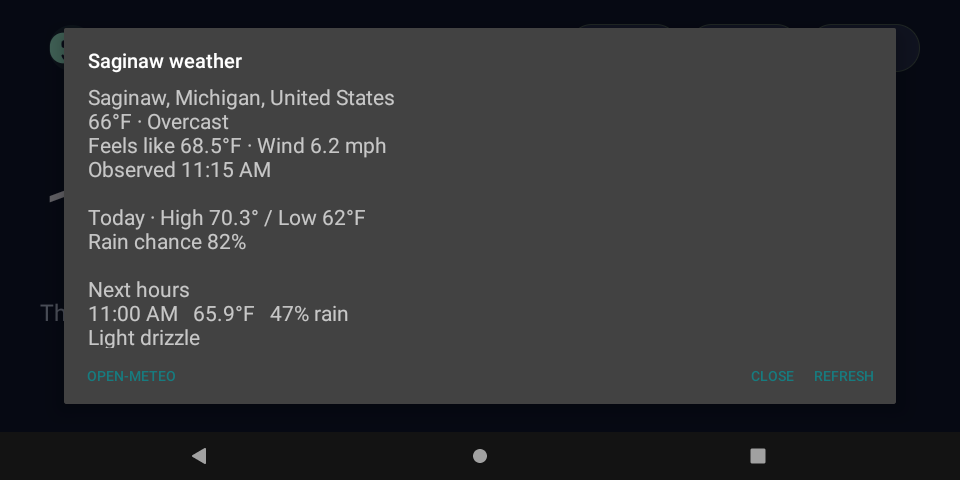
- Weather: Ask “What's the weather?” Check the location and Fahrenheit units. From Home, open Weather and confirm current conditions, today's high/low and rain chance, and up to six hourly forecasts.
- Timer: Ask for a 20-second test timer, end the conversation, and confirm the alarm sounds. Tap Stop.
- Xbox preset: Start Xbox from Timers. It must begin at one hour. Start it again while running: it should show the existing countdown, not reset to an hour. Cancel the test timer when finished.
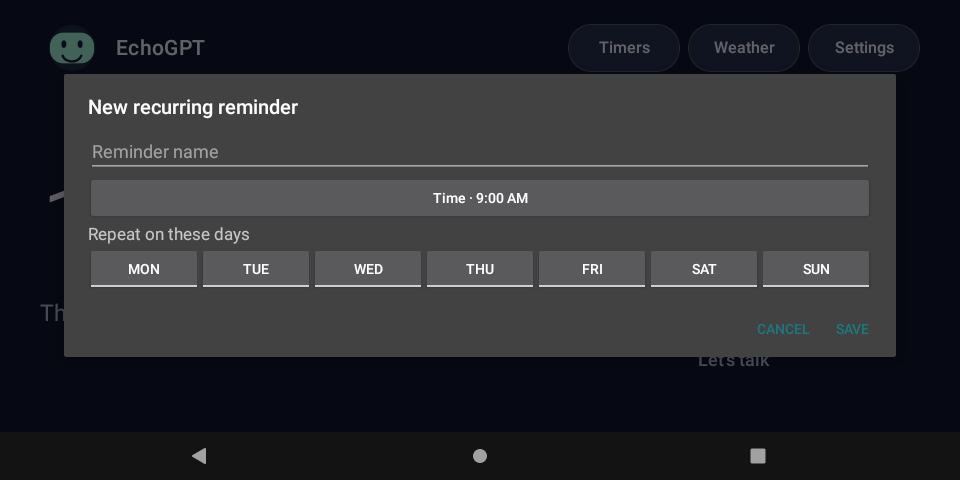
- Recurring reminder: Add a clearly labeled temporary reminder for a minute or two ahead on today's weekday. Verify it rings and Stop silences this occurrence while the next recurrence remains. Delete the temporary reminder afterward.
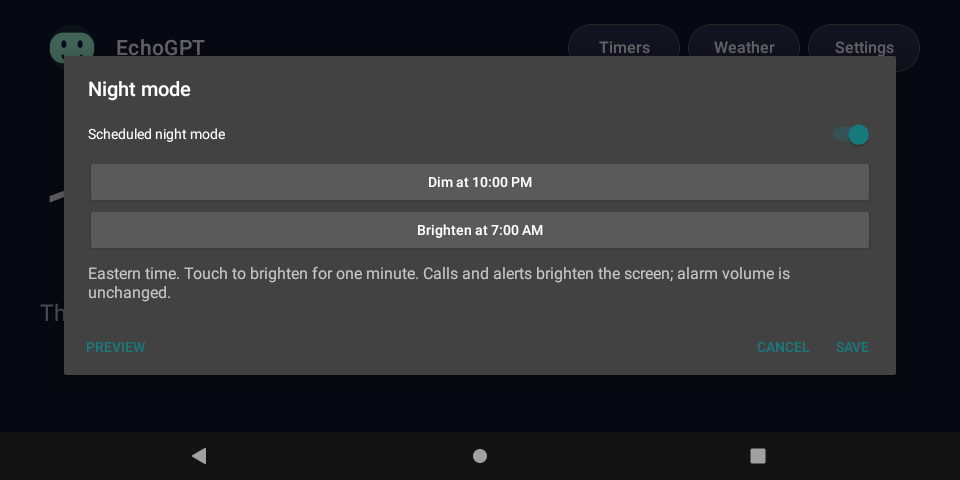
- Night mode: Open Settings > Night mode and use its 15-second preview. The display should dim. The first touch should brighten it without starting a conversation; a second touch operates the controls. Timer/reminder volume should remain audible.
- Independence: Unplug only the USB cable, leaving wall power and Wi-Fi connected. Repeat a voice call. It should work with the Mac or PC off.
- Your final deployment check: When no update is running, restart once and confirm the default Home, wake listener, time and saved schedules return. Try a short timer with Wi-Fi unavailable; restore connectivity afterward. These checks should be performed on each new unit, especially a Show 8.
The reference Show 5 passed live voice, repeated wake/chime cycles, spoken search and source links, weather, timer alarms, a recurring reminder, Xbox behavior, night preview, Show answer, and operation with USB disconnected. The full public setup helper sequence has not been rerun from stock on a second unit. Overnight endurance and every power/network failure case are not claimed as tested.
Step 12Make it part of family life
Useful things to say
- “Search the web for the library's opening hours today.”
- “What's the weather? Will it rain this afternoon?”
- “Set a pasta timer for ten minutes.”
- “Start the Xbox timer.”
- “Remind me every weekday at seven thirty AM to pack my lunch.”
- “List my reminders.”
- “End this conversation.”
Use Show answer for the latest completed response and Sources for search citations. The face responds to listening, thinking and playback; its motion is a conversation indicator, not phoneme-accurate lip sync.
Timers are local and continue after a conversation or Wi-Fi loss. There are up to eight named timers and sixteen weekly recurring reminders. The Echo must remain powered: it cannot ring while unplugged. A due alarm ends an active conversation so it can be heard. Stop dismisses a reminder occurrence without deleting its recurrence; delete the reminder when you no longer want it.
Night mode defaults to 10 PM-7 AM in the configured zone. It dims the app window, not alarm volume. A touch temporarily brightens the screen for one minute. Settings can change or disable the schedule.
Wake-word recognition can be paused in Settings. During a call, Mute stops outgoing microphone audio. Call speaker volume and idle/media volume may be separate Android controls. Use age-appropriate supervision: a friendly interface is not a parental-control system, and answers or search results can be wrong.
Step 13Fix common setup problems
| Symptom | Check / next action |
|---|---|
| No USB device | Try a known data cable and direct USB port; keep wall power connected. On Windows, inspect Device Manager and the maintainer's driver advice. Do not install random driver packs. |
adb says unauthorized |
Unlock the Echo and accept the computer's RSA prompt. Fastboot mode and Android ADB mode are different. |
| Payload resparse error on Mac | Review Step 5's observed -S 128M workaround and the profile-selected file. It is not proof that every fastboot error has the same cause. |
| Device mismatch / eMMC-RO | Stop. Recheck model/package or diagnose failed storage. Never bypass the checks. |
| Wi-Fi stopped working after reboot | When idle, try a full power disconnect for about ten seconds. Never do this during flashing. |
| Wrangler login does not work | Verify email, complete OAuth authorization, confirm the intended account with whoami. An open logged-in dashboard is not sufficient CLI authorization. |
| Health works but voice fails | Check both secret names, project billing/model access, Realtime permission, Echo clock/Wi-Fi and exact Worker origin. Health does not contact OpenAI. |
| Search fails but voice works | Check Responses Write permission and the configured search model. Read only sanitized error codes, not provider bodies or tokens. |
| Device connection required | Verify the bootstrap was signed with your key, the pairing file is valid, and the helper selected the right USB serial. Pair before installing the release. |
| App update signature mismatch | Restore the original signing key. Do not uninstall without explicitly accepting loss of local state and reprovisioning. |
| No chime on later calls | Wait for wake-ready status and check both call and media volume. Confirm you installed the supplied current source, not an older browser-based version. |
| New calls paused / incomplete accounting | Open usage status, review provider usage and the missing-cost warning. Acknowledge only after the owner explicitly reviews it. Do not auto-acknowledge or reset storage to remove the gate. |
| Rate limit / active lease | Respect the displayed delay. The one-device lease expires after 330 seconds if it cannot be released. Avoid repeated automatic paid retries. |
| Duplicate BuildConfig / cache failures | Build outside cloud-synced folders and remove only generated build/cache output before retrying. Preserve keys and pairing material. |
| Wrong city or reminder hour | Review the complete personalization map; changing Android's time zone alone is insufficient for this fixed-zone reference. |
A device-specific diagnostic trap: Do not run adb shell dumpsys media.audio_flinger on this firmware. Its vendor debug callback crashed the reference audio service. Use app status and ordinary package/process checks instead. Never paste API keys, bearer tokens, audio, transcripts or full credential responses into support logs.
Step 14Keep it maintainable
Keep a private backup of the pairing file, signing key/password, your chosen configuration, and the Worker URL. Keep the OpenAI project key in a password manager or provider secret store. The Android Keystore credential is not transferable by copying the installed APK.
For an app update, build the next version, sign with the same private key, and use adb install -r. Do not uninstall first. For a broker update, run its tests and deploy to the same Worker, preserving the Durable Object binding/migration history and usage data. One broker instance is designed for one Echo; give a second Echo a separate Worker and device token unless you deliberately implement multi-device support.
Keep the pinned runtime and model until a replacement has passed actual ARMv7 device tests. Check upstream firmware release notes before changing the OS. A community Android 11 image should not be treated as a currently supported general-purpose secure tablet; use it as an appliance and avoid signing into unrelated sensitive services.
Review OpenAI usage and Cloudflare quotas periodically. The internal $40 estimate can diverge from invoices because of delayed or incomplete records and conservative search allowances. Removing limits is not a troubleshooting step.
If you retire the device, revoke its OpenAI key or remove the dedicated Worker secrets, then erase its local data before giving it away. Do not delete another project's cloud resources.
What is included, and what is not
The starter contains EchoGPT source, tests, pinned wake/WebRTC binaries and model, dependency provenance, and third-party notices. It contains no author account credentials, private signing key, pairing token, personal Worker URL, device serial, or private build logs. Firmware is obtained from its maintainers. Each reader creates their own cloud instance and signing identity.
The tutorial and EchoGPT-specific material are provided free for learning and recreation. Preserve attribution and all third-party license notices when sharing. Individual upstream projects retain their licenses; this guide does not relicense their code or models. No affiliation or endorsement by Amazon, OpenAI, Cloudflare, LineageOS or the community maintainers is implied.
Step 15What about an Echo Show 8?
Yes, the first-generation Echo Show 8 has the community prerequisites for this approach. We have not tested EchoGPT on it.
The maintainer's amonet support table explicitly lists the Echo Show 8 first generation (2019), codename crown, product AEOCW. The same community publishes a separate LineageOS 18.1 crown v0.5 release. That establishes unlock/Android availability, not that our microphone handoff, wake model, audio routing or layout will behave identically.
For a Show 8 experiment:
- Verify it is the 2019 first generation and that its bootloader identifies as crown. Stop for a different generation or ambiguous identification.
- Follow the crown-specific unlock instructions and use its matching package and recovery.
- Follow the crown-specific ROM instructions. The researched release is
lineage-18.1-20260904-UNOFFICIAL-crown.zip, whose publisher SHA-256 is below. - Continue with the account, broker and app steps only once Android, Wi-Fi, audio and the required ABI/API level are confirmed. The supplied app is ARMv7 and requires Android 11/API 30 or newer; availability of a compatible ABI must be verified on the actual unit.
- Repeat the full acceptance checklist. Pay particular attention to microphone/speaker routing, repeated wake cycles, chimes, timers and the larger screen. Record results before describing the Show 8 build as working.
a01359a5e13dad8ac24c5507e8a747163b992012410b14d2ca9a8711ec4a1491
Never flash a checkers payload, recovery or ROM to crown. The Mac payload size workaround documented for our Show 5 is not validated for the Show 8. No compatibility promise is made here for a second- or third-generation Show 8.
Credits and further reading
The hardware reuse is possible because of R0rt1z2, k4y0z and the amonet / amazon-oss / LineageOS communities. Wake recognition uses sherpa-onnx, with pinned runtime/model details in starter/dependencies.json. Native calls use WebRTC Android packaging, OpenAI Realtime WebRTC, and OpenAI web search. Weather comes from Open-Meteo; its free endpoint terms and attribution must be respected, especially if adapting this household tutorial into a commercial service.
Research and pricing snapshot: October 1, 2026. Links and service interfaces can change. SOURCES.md lists the primary references and which claims they support. This page and the PDF, Markdown and HTML editions in the download describe the same project; CODEX-SETUP.md is the operational handoff for a local coding agent.
Checked October 1, 2026. Primary project/provider sources are listed below. The tutorial also draws on the actual source, pinned local unlock package, successful recovery log, build/tests and user-confirmed acceptance of the reference Echo Show 5. Local household identifiers and logs are deliberately excluded.
Hardware and firmware
- R0rt1z2 amonet: support table explicitly lists Echo Show 5 2019/checkers/AEOCH and Echo Show 8 2019/crown/AEOCW. This establishes community unlock support, not EchoGPT app validation on crown.
- Upstream fastbrick script: stock fastboot button combination, product/unlock checks, package profile selection, bounded transfer behavior and failure signals. The Mac
-S 128Madjustment is from our own successful build records, not an upstream general recommendation. - Upstream recovery step: matching TWRP recovery/swdl flash sequence.
- Checkers LineageOS v0.7: pinned Show 5 Android 11 image and publisher SHA-256.
- Crown LineageOS v0.5: separate first-generation Show 8 Android 11 image and publisher SHA-256.
- Crown device tree: upstream identification of the 2019 Show 8 target.
- Show 5 unlock thread and ROM thread: maintainer instructions/downloads linked by upstream. Direct access was blocked during this publication pass; their current text was not revalidated. Readers must review these before flashing.
- Show 8 unlock thread and ROM thread: crown-specific instructions linked by upstream; same access limitation.
Service setup and pricing
- OpenAI separate ChatGPT/API billing: separate account billing systems.
- OpenAI API key permissions: restricted key configuration. The actual reference integration verified Realtime Request plus Responses Write.
- Realtime Mini model: model availability/features and token rates at publication.
- OpenAI API pricing: search-call fees and search token billing. The tutorial's 20/day example is explicit arithmetic from an assumed token budget, not a measured average call length.
- Realtime WebRTC and web search: integration architecture and citations.
- Cloudflare Workers getting started, Wrangler commands and secrets: OAuth/deploy/secret setup. CLI documentation was also cross-checked using Context7 against the official Workers SDK repository.
- Durable Objects pricing: SQLite Durable Objects on the Workers Free plan; limits and paid usage terms can change.
- Open-Meteo license/terms: data attribution and free endpoint usage conditions. A free tutorial does not automatically authorize a commercial hosted weather service.
Tools and bundled components
- Android platform-tools, Android SDK, Temurin, Gradle distributions, Node downloads, Python downloads.
- sherpa-onnx 1.11.5, keyword models, WebRTC Android 144.7559.15, Gson.
starter/dependencies.jsonrecords exact artifact digests and distinguishes publisher checksums from locally recorded fingerprints. Preservestarter/licenses/when sharing the included components.
Interpretation boundaries
The Show 5 installation and app behavior were demonstrated on our physical unit. Show 8 feasibility is an inference from available model-specific unlock and Android ports; it has not been tested with this app. Windows feasibility follows the availability of native toolchains and the package's Windows scripts; that workflow has not been exercised by this project. New readers must complete physical acceptance checks on their own device.
Not ready to flash firmware? Start smaller.
Most teams do not need to rebuild a smart speaker. They need to know which AI tools are worth using and how to use them safely. The free Team Readiness Check takes a few minutes and points you at your highest-value next step.